Use Hashicorp cloud_autojoin with OpenStack
2 minute read
Overview
Cloud_autojoin is a Hashicorp feature, that helps to create Nomad-, Consul- and Vault-clusters, without knowing the ip-adresses of the cluster nodes. Those nodes can use Hashicorps go-discover, to detect the ip-addresses of the other cluster nodes during startup via meta-tags in order to build a cluster. Go-discover supports various cloud providers - one of them: OpenStack. In this tutorial we explain how to use it.
Cloud_autojoin in OpenStack
Cloud_autojoin uses the cloud project credentials to find cloud instances in the project and read their meta-tags. Is an instance with the configured meta-tag detected, it will be identified as a cluster node and its ip-adress will be used to build a cluster.
Configuration options
The relevant configuration options for cloud_autojoin in OpenStack depend on whether the project credentials are username/password or a token.
provider:   "os"
auth_url:   The endpoint of OS identity
project_id: The id of the project (tenant id)
tag_key:    The tag key to filter on
tag_value:  The tag value to filter on
user_name:  The user used to authenticate
password:   The password of the provided user
token:      The token to use
insecure:   Sets if the api certificate shouldn't be check. Any value means true
Example
The server_join stanza in a Nomad server configuration could look like this:
server_join {
  retry_join = [ "provider=os tag_key=nomad-role tag_value=server auth_url=https://prod1.api.pco.get-cloud.io:5000 project_id=myprojectid user_name=myusername password=\"mypassword\"" ]
  retry_interval = "15s"
}
Systemd
The “sensitive” values could also be provided as environment variables in an “env”-file for systemd, in order to reference it from the systemd unit-file:
[Unit]
Description=Nomad
Documentation=https://www.nomadproject.io/docs/
Wants=network-online.target
After=network-online.target

[Service]
EnvironmentFile=/etc/nomad/nomad.env
User=nomad
Group=nomad
ExecReload=/bin/kill -HUP $MAINPID
ExecStart=/usr/local/bin/nomad agent -config /etc/nomad
KillMode=process
KillSignal=SIGINT
LimitNOFILE=65536
LimitNPROC=infinity
Restart=on-failure
RestartSec=2
TasksMax=infinity
OOMScoreAdjust=-1000

[Install]
WantedBy=multi-user.target
The /etc/nomad/nomad.env file could look like this:
OS_AUTH_URL=https://prod1.api.pco.get-cloud.io:5000
OS_USER_NAME=myusername
OS_PASSWORD=mypassword
OS_PROJECT_ID=myprojectid
That would lead to a shortened entry in the configuration file:
server_join {
        retry_join = [ "provider=os tag_key=nomad-role tag_value=server" ]
        retry_interval = "15s"
}
Meta-Tags
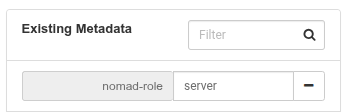
The meta-tags could be set during creation of the instance via Terraform:
metadata = {
   nomad-role = "server"
}
Or using the instace action
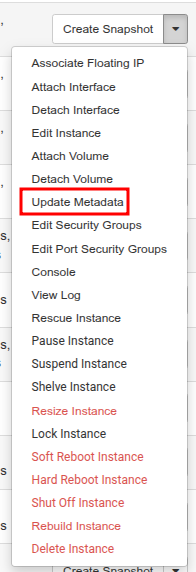
in Horizon: